Best email marketing for yoga teachers
Collect emails at the end of class with a QR code. Send your schedule every Sunday night. Announce workshops to your list 2 weeks before the studio posts them. SendFox is free up to 1,000 contacts, then $29 once for 5,000.
Free up to 1,000 contacts. No card.
Studios come and go. Timetables change. If your students only know where you teach through the studio's app, you lose them every time you switch studios.
The example is Aiko from Slow Flow, a made-up teacher with two studio classes and one online class a week. Aiko is invented. The emails, schedule and screenshots are real and copyable.
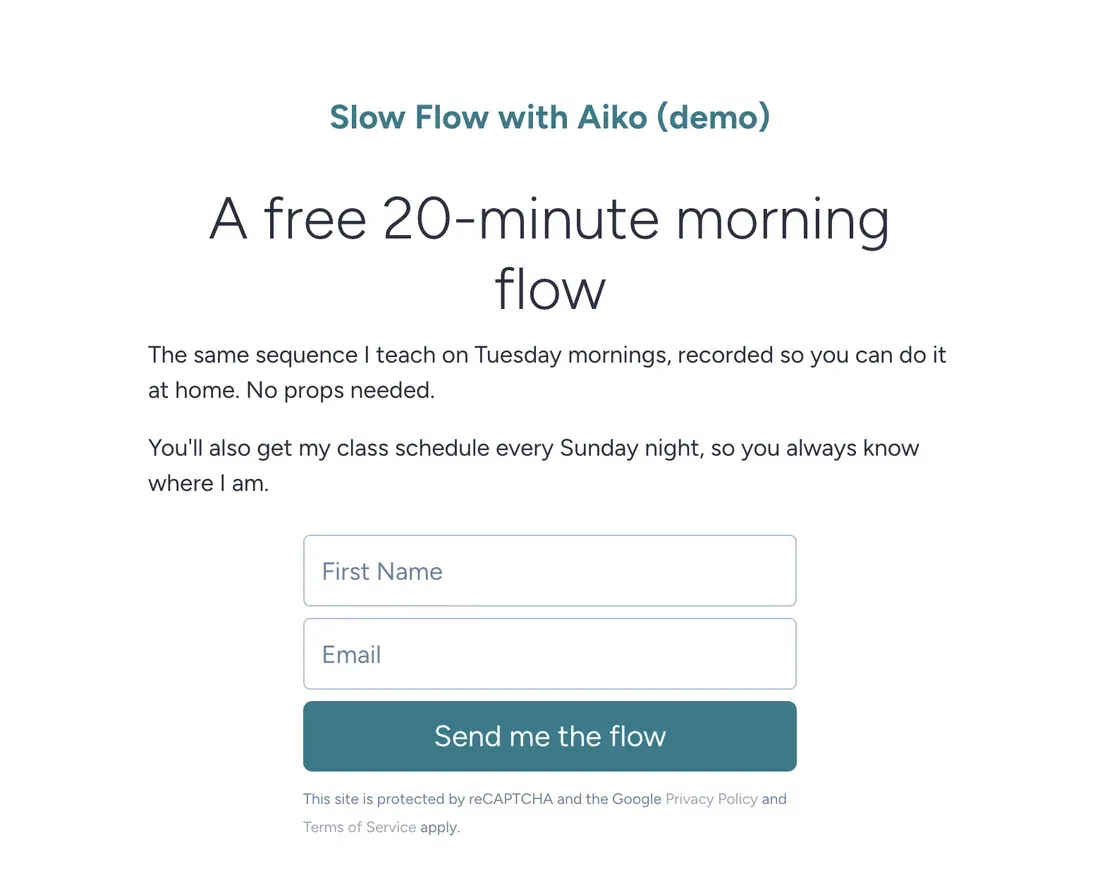
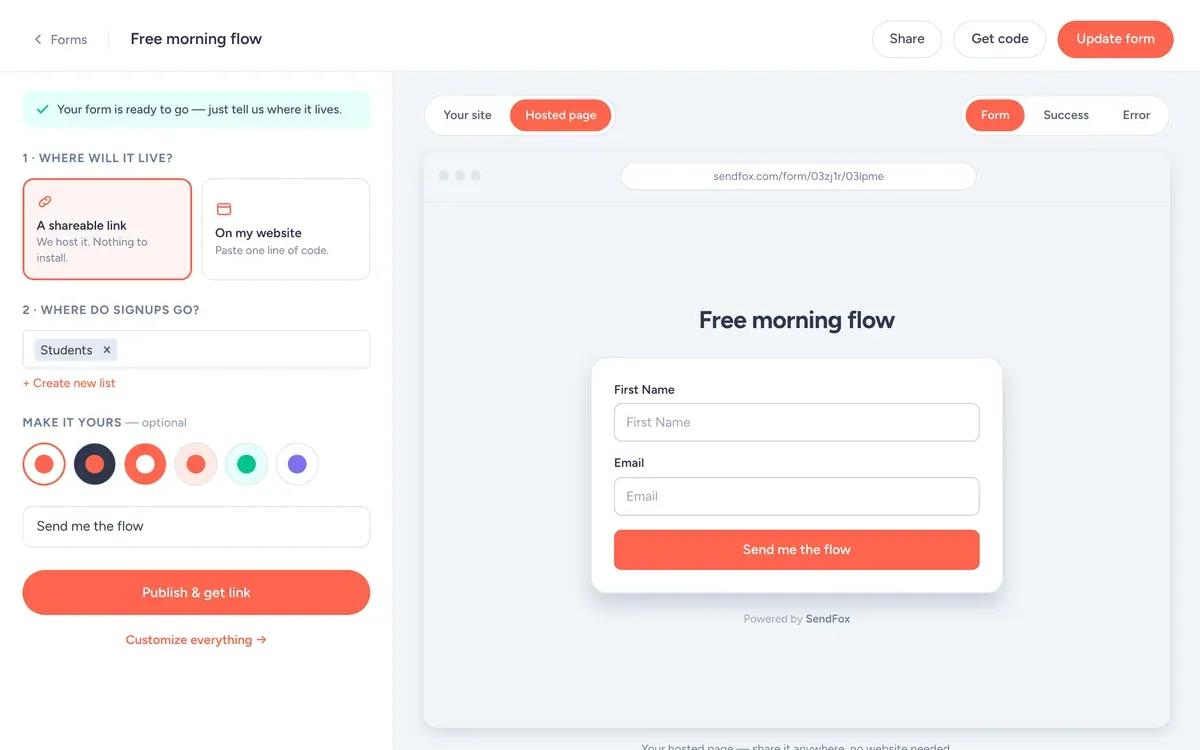
The signup form
- Fields: First name and email. Every extra field costs signups.
- Button: "Send me the flow"
- What they get: A free 20-minute morning flow video, no props needed.
- Where signups go: the Students list, which starts the welcome automation.
Use it as a hosted link (your bio, a QR code, the back of a book) or paste one line of code to put it on your site.
Get the email at the end of class
Savasana is over, people are rolling up mats, they feel great. That's your moment. Say one sentence: "If you want the free 20-minute morning flow, scan the code by the door."
Aiko's QR code points to a SendFox Smart Page. The first time she tried it, she got more signups in one class than her Instagram bio link got in a month. Results vary. The point is to ask in person.
The Sunday night schedule email
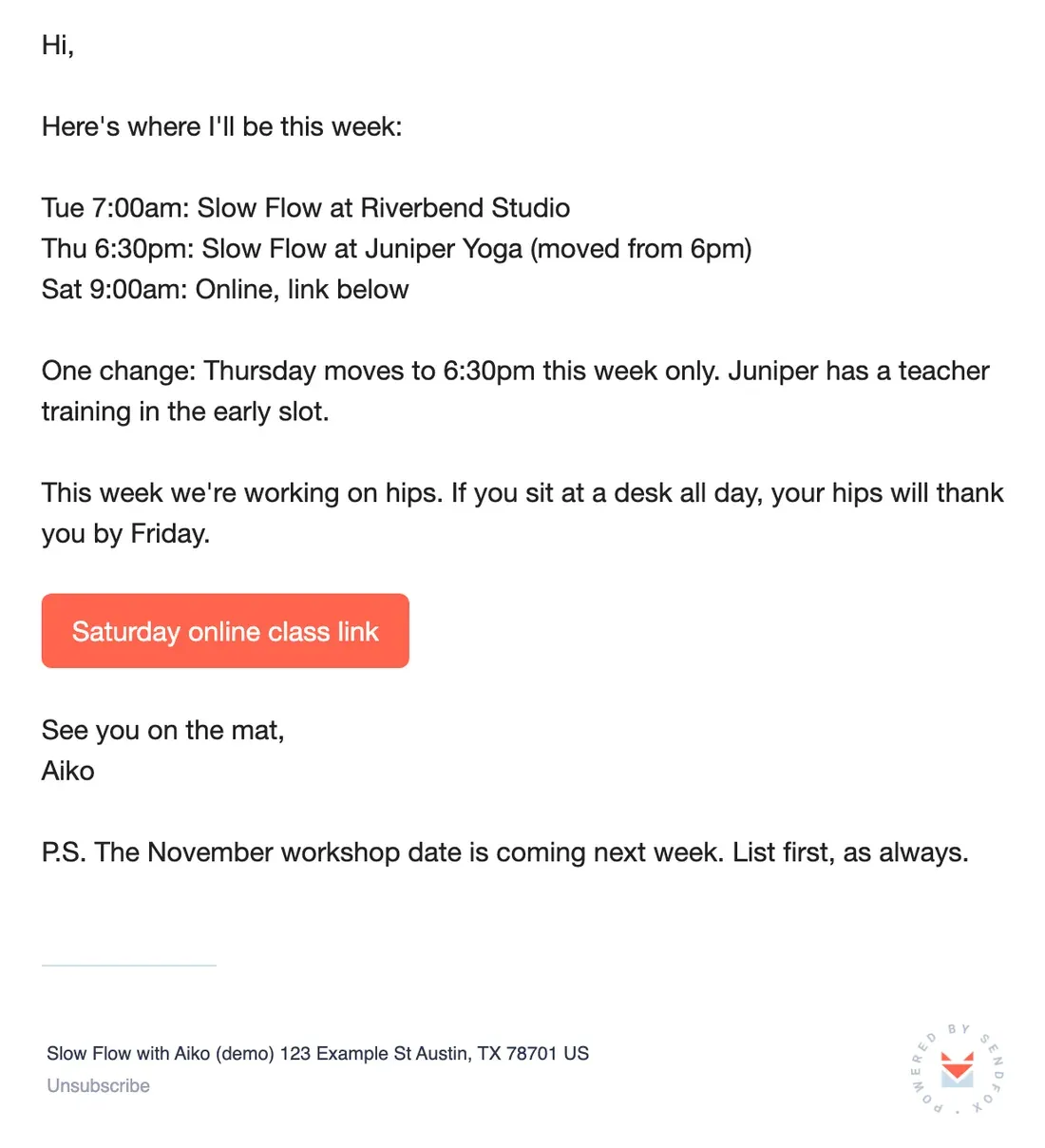
This is the email Aiko's students actually rely on. It's mostly a schedule. The one change is in bold, basically, and in the subject line.
Put changes in the subject line. People don't open "Weekly update". They do open "Thursday moves to 6:30".
Copy the text of this email
Hi,
Here's where I'll be this week:
Tue 7:00am: Slow Flow at Riverbend Studio
Thu 6:30pm: Slow Flow at Juniper Yoga (moved from 6pm)
Sat 9:00am: Online, link below
One change: Thursday moves to 6:30pm this week only. Juniper has a teacher training in the early slot.
This week we're working on hips. If you sit at a desk all day, your hips will thank you by Friday.
[Button: Saturday online class link]
See you on the mat,
Aiko
P.S. The November workshop date is coming next week. List first, as always.
Don't turn your email into a workout. Students want the when and where, then one small thing to think about.
From the SendFox teamLists and tags to create
Create these on day one, with these exact names, so every email has an obvious place to go.
StudentslistEveryone. The Sunday schedule goes here.
Workshop waitlistlistFirst 10 spots for every workshop.
riverbendtagStudents from one studio, for class changes that only affect them.
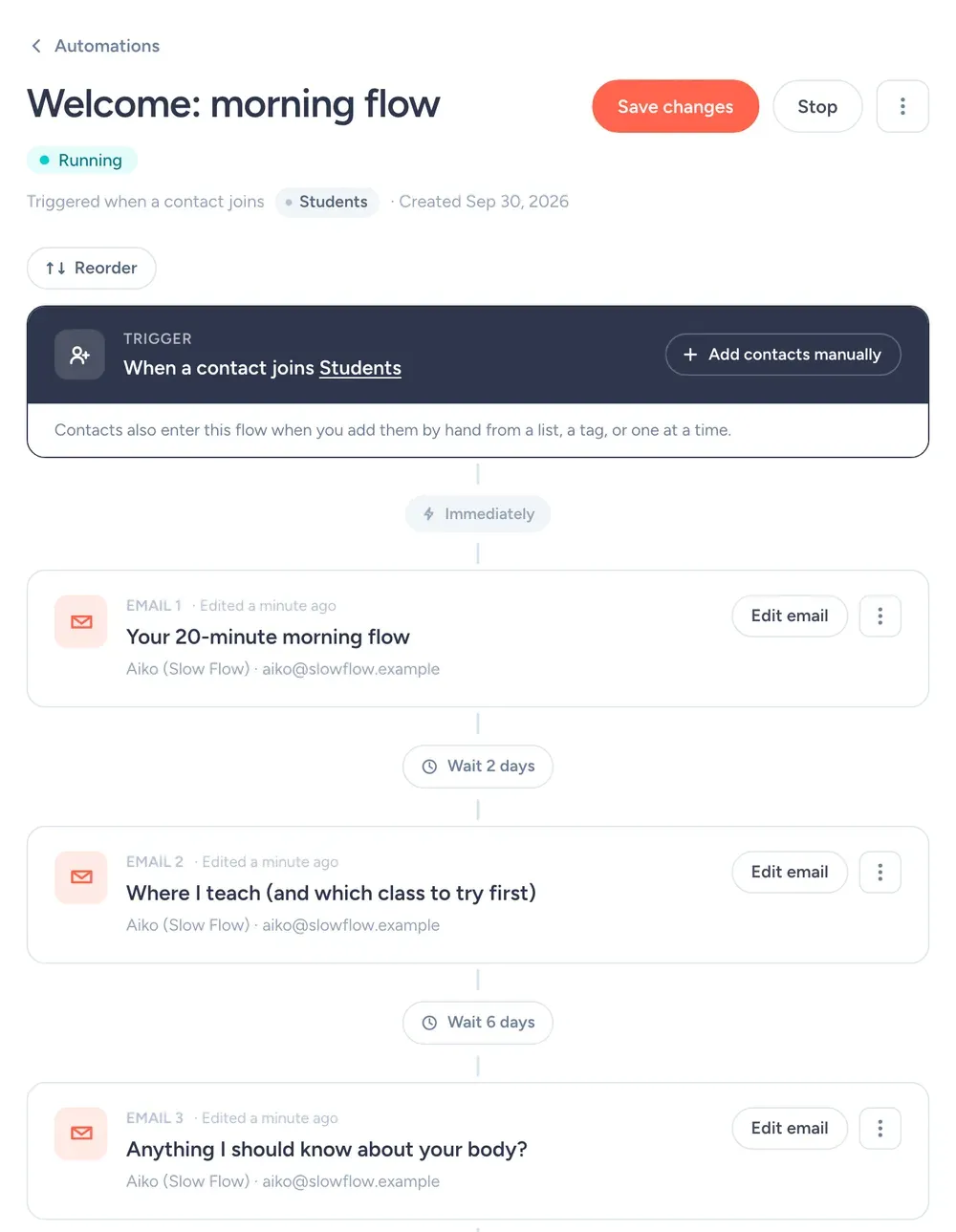
Your first automation
It runs when someone joins the Students list:
- Right away"Your 20-minute morning flow"The video link and a note about doing it on a hard floor.
- 2 days later"Where I teach (and which class to try first)"The weekly schedule with a line about each class.
- 6 days later"Anything I should know about your body?"Invites them to reply about injuries or goals before their first class.
The third email gets replies about knees, backs and pregnancies. That's exactly the stuff you want to know before someone walks into your class.
A workshop month, with dates
- Sun Oct 4, 8pm
Weekly schedule.
- Sun Oct 11, 8pm
Weekly schedule, plus "Hips workshop Nov 7, list gets first 10 spots."
- Tue Oct 13
Workshop waitlist list only: the sign-up link.
- Sun Oct 18, 8pm
Weekly schedule. "4 workshop spots left."
- Sun Oct 25, 8pm
Weekly schedule. Studio posts the workshop publicly on Monday.
Every Sunday at 8pm. Don't skip weeks when nothing changes. "Same as last week" is still useful, and it keeps you in the habit.
Say you have 350 students on the list. If 55% open the workshop email, 190 people see it.
If 5% of the whole list sign up, that's 17 people. That fills most of a 20-spot workshop before the studio posts it.
Rough math, not a promise. Round numbers for illustration; they aren't SendFox data, and your list will do its own thing.
What you'll use in SendFox
Smart Page + QR code
The signup page up top.
Free: 1 · Lifetime & Pro: unlimitedLists
Students, plus a Workshop waitlist. Free includes 3 lists.
Free: 3 lists · Lifetime & Pro: unlimitedScheduling
Write the Sunday email on Saturday. It goes out on its own.
Every planTidyCal booking block
For private sessions. Insert a booking link from the editor.
Every planSubject lines
What not to put in the email
Skip the long philosophy essay. Your students want to know when and where, plus maybe one thing to think about on the mat. Save the essay for a workshop.
Don't promise that a pose fixes back pain or anxiety. Describe what a class feels like and who it's for, and let people decide. It's more honest, and it keeps you out of trouble.
And don't apologize for emailing. "Sorry to bother you!" in a schedule email makes it sound like a bother. People signed up to hear from you.
Settings for a studio list
| Setting | What to set | Why |
|---|---|---|
| From name | Aiko (Slow Flow) | Students follow Aiko between studios. |
| From email | An address you actually read | Replies go to your from address. Replies are the best signal you'll get. |
| Send time | Sunday, 8pm | People plan their week on Sunday night. Campaigns schedule in your time zone. |
| Double opt-in | Leave it on to start | Confirmed subscribers mean fewer typos and fake signups. Single opt-in is available on Pro, or on Lifetime after a one-time domain setup. |
| Lists and tags | Students, Workshop waitlist, riverbend | So each email goes only to the people it's for. What each one is for is spelled out in the lists and tags section. |
| Engaged only | On for promos, off for must-read news | It sends only to people who opened in the last 90 days or joined recently. |
| Footer | Nothing to add | SendFox adds your mailing address and an unsubscribe link to every campaign. You'll need to enter your address before your first send. |
What it costs
Free
1,000 contacts, 3,000 sends a month. 1 Smart Page, 1 form, 1 automation.
Lifetime
5,000 contacts and 300,000 total sends. Unlimited automations, Smart Pages and forms.
Pro
From 5,000 contacts and 100,000 sends a month. Paid newsletters, teammates, no SendFox branding.
| Plan | Price | Contacts | Sends | Smart Pages, forms, automations |
|---|---|---|---|---|
| Free | $0 | 1,000 | 3,000 / month | 1 of each |
| Lifetime | $29, once | 5,000 | 300,000 total | Unlimited |
| Pro | From $19 / month | 5,000 to 250,000 | From 100,000 / month | Unlimited |
Free and Lifetime emails carry a small SendFox footer; Pro removes it. Pro also adds paid newsletters on your own Stripe account, MCP access and teammates. Current plans: sendfox.com/pricing.
A weekly email to a few hundred students fits on Free. Past 1,000 contacts, $29 once covers 5,000.
How that compares to 12 other tools at 5,000 to 100,000 subscribers: email marketing pricing compared.
FAQ
What is the best email marketing platform for yoga teachers?
One that makes a weekly schedule email quick to send. SendFox is free for 1,000 contacts and 3,000 sends a month, then $29 once for 5,000, with signup pages and scheduling on every plan.
How do I get students onto my email list?
Ask at the end of class and make it easy: a QR code to your Smart Page and one reason to scan it, like a free flow video.
Can I send different schedules to different studios?
Yes. Keep a list per studio or class and send each list its own email. Free includes 3 lists; Lifetime and Pro include more.
Can students book private sessions from my emails?
Yes. Connect TidyCal and insert a booking link from the email editor, or paste a link from any booking tool.
Copy this setup this afternoon
Free for 1,000 contacts. $29 once for 5,000. Import from Mailchimp, Kit or a CSV.
Free up to 1,000 contacts. No card.
Keep reading
The example senders on this page are made up. The screenshots are from a SendFox demo account set up to match them, before any emails were sent.