Best email marketing for churches and ministries
Send one weekly email on the same day, with this week's services and events. Welcome newcomers with an automated 3-email sequence. Turn your sermon podcast into recap emails with RSS. SendFox is free up to 1,000 contacts, then $29 once for 5,000.
Free up to 1,000 contacts. No card.
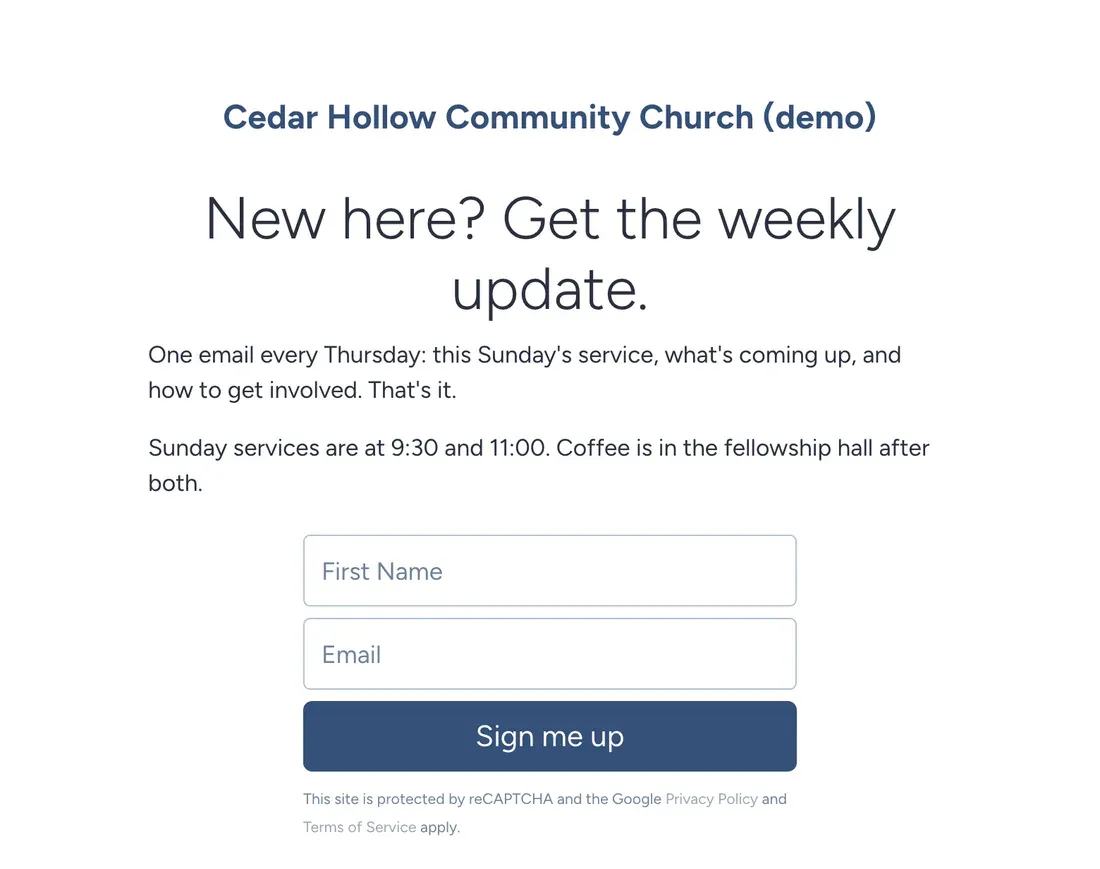
Half your congregation doesn't read the bulletin. The other half lost it in the car. One weekly email reaches everyone, including the people who missed Sunday.
The example is Cedar Hollow Community Church, a made-up church of about 300 people where a part-time admin runs communications. The church is invented. The setup, emails and screenshots are real.
The newcomer welcome comes first
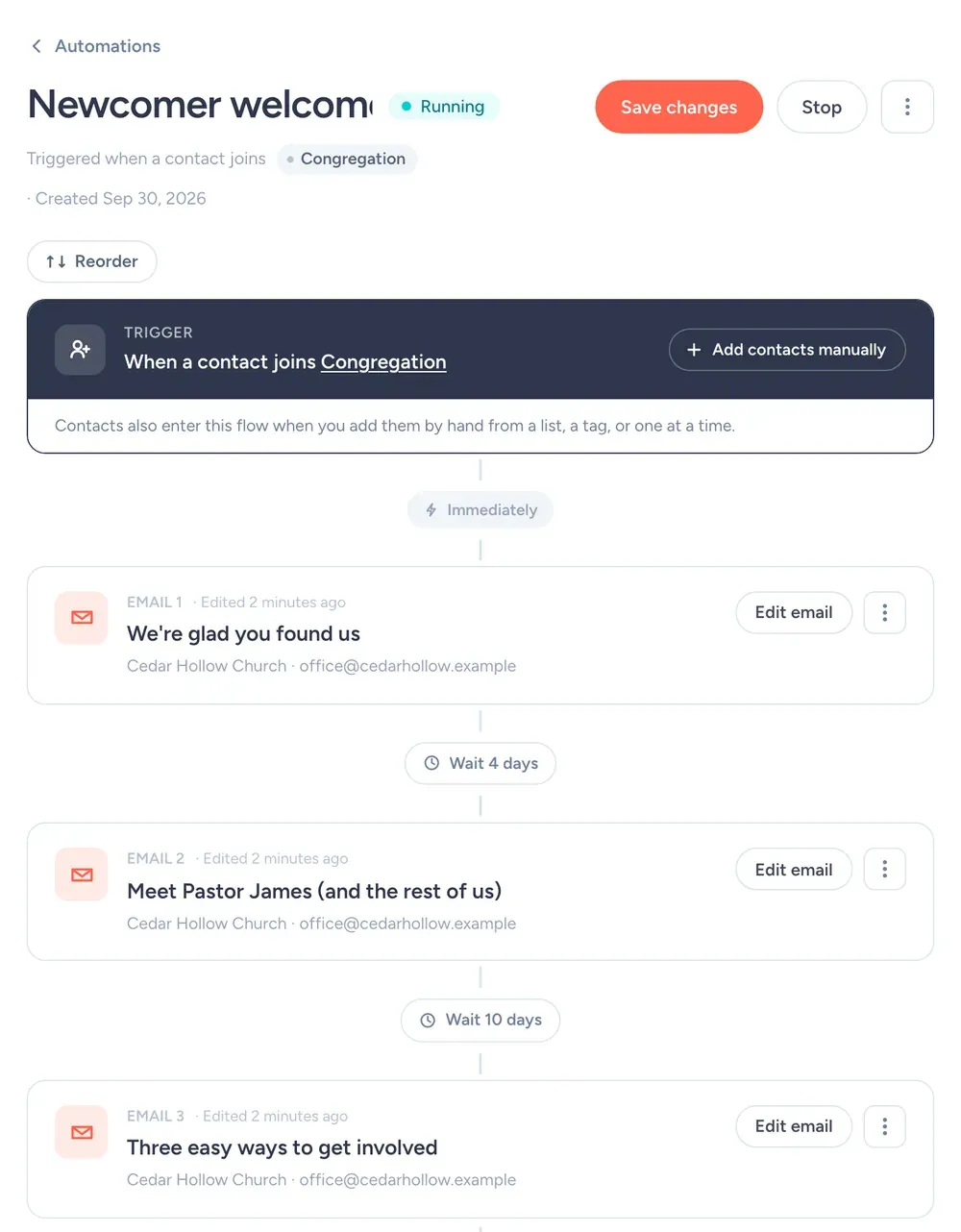
A first-time visitor fills in a card or scans the QR code on the welcome table. Then this runs on its own:
- Right away"We're glad you found us"Service times, parking, and what to expect on a first Sunday.
- 4 days later"Meet Pastor James (and the rest of us)"A short hello from the pastor and photos of the team.
- 10 days later"Three easy ways to get involved"Small groups, the food pantry and the welcome team, each with a sign-up link.
The biggest drop-off in any church is between the first and second visit. This sequence covers that gap without anyone on staff remembering to follow up.
The lists and tags to set up
Create these on day one, with these exact names, so every email has an obvious place to go.
CongregationlistEveryone. The Thursday update goes here.
VolunteerslistSign-up asks only go here.
Youth parentslistYouth group logistics.
newcomer-2026tagEveryone who filled in a welcome card this year.
What the form asks for
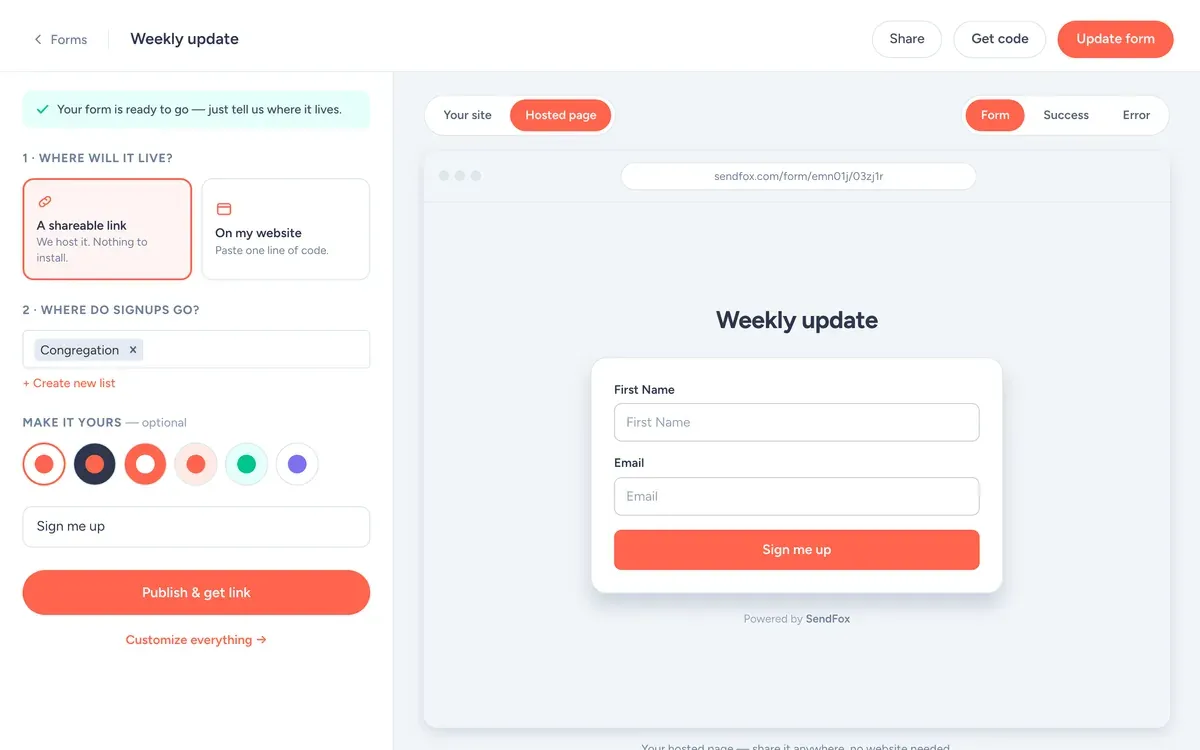
- Fields: First name and email. Every extra field costs signups.
- Button: "Sign me up"
- What they get: The weekly update: this Sunday's service, what's coming up, and how to help.
- Where signups go: the Congregation list, which starts the welcome automation.
Use it as a hosted link (your bio, a QR code, the back of a book) or paste one line of code to put it on your site.
The Thursday update
Every Thursday at 10am. This Sunday, two or three dates, one volunteer ask. Anything longer and people skim past the one thing you needed them to see.
One ask per email. If you need volunteers for four things, you'll get volunteers for none of them.
Copy the text of this email
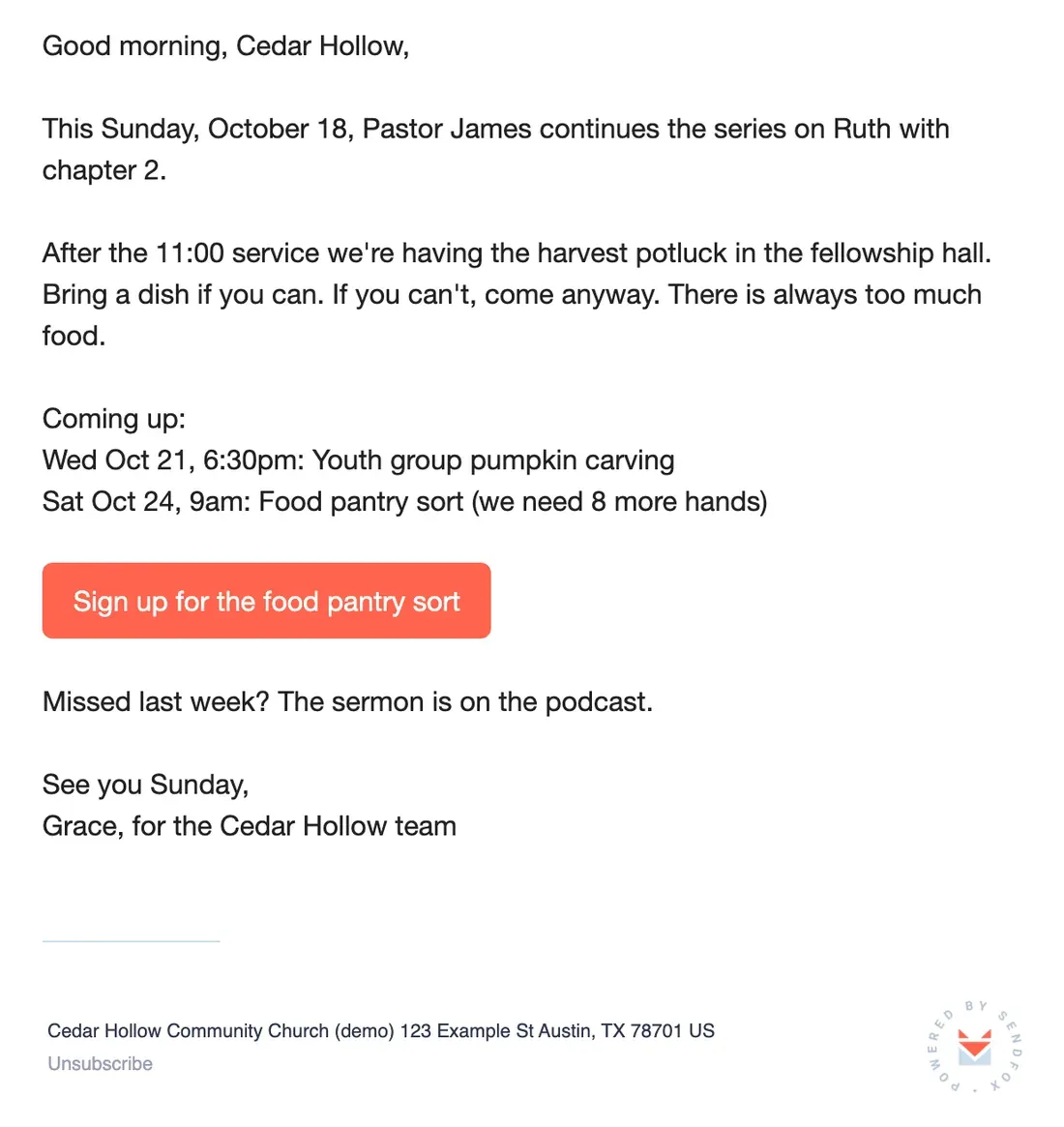
Good morning, Cedar Hollow,
This Sunday, October 18, Pastor James continues the series on Ruth with chapter 2.
After the 11:00 service we're having the harvest potluck in the fellowship hall. Bring a dish if you can. If you can't, come anyway. There is always too much food.
Coming up:
Wed Oct 21, 6:30pm: Youth group pumpkin carving
Sat Oct 24, 9am: Food pantry sort (we need 8 more hands)
[Button: Sign up for the food pantry sort]
Missed last week? The sermon is on the podcast.
See you Sunday,
Grace, for the Cedar Hollow team
Send it on the same day every week. People start looking for it.
From the SendFox teamSay you have 300 people on the list. If 60% open the Thursday update, 180 people read it.
If 3% of the whole list sign up for the food pantry sort, that's 9 volunteers. You needed 8.
Rough math, not a promise. Round numbers for illustration; they aren't SendFox data, and your list will do its own thing.
Useful SendFox features for churches
RSS feed to draft email
If your sermons go out as a podcast or blog, connect the feed. Each new sermon becomes a draft recap email.
Every planLists by group
Congregation, Volunteers, Youth parents. Send to one or a few.
Free: 3 lists · Lifetime & Pro: unlimitedScheduling
Write Thursday's email on Tuesday and schedule it.
Every planTeammates on Pro
On Pro, invite staff or volunteers to help run the account.
ProOctober at Cedar Hollow
- Thu Oct 1
Weekly update.
- Mon Oct 5
Sermon recap from the RSS draft, to Congregation.
- Thu Oct 8
Weekly update.
- Tue Oct 13
Volunteers list only: food pantry sign-up.
- Thu Oct 15
Weekly update: harvest potluck (above).
- Wed Oct 21
Youth parents only: pumpkin carving reminder.
Subject lines
Who writes it
In most small churches, the weekly email falls on one person, usually on a Wednesday night. Make it easy for them. Ministry leaders send their items by Tuesday noon, in two sentences each. Anything later waits a week.
Grace at Cedar Hollow keeps a saved template with the same four headings every week: This Sunday, Coming up, How to help, and a sign-off. The email takes 20 minutes because the structure never changes.
Be careful with prayer requests. Don't put names or health details in an email that goes to 300 people unless the person asked you to. Point people to the prayer team instead.
Settings for a church list
| Setting | What to set | Why |
|---|---|---|
| From name | Cedar Hollow Church | People recognize the church name in their inbox. |
| From email | An address you actually read | Replies go to your from address. Replies are the best signal you'll get. |
| Send time | Thursday, 10am | Late enough to include Sunday details, early enough to plan the weekend. Campaigns schedule in your time zone. |
| Double opt-in | Leave it on to start | Confirmed subscribers mean fewer typos and fake signups. Single opt-in is available on Pro, or on Lifetime after a one-time domain setup. |
| Lists and tags | Congregation, Volunteers, Youth parents, newcomer-2026 | So each email goes only to the people it's for. What each one is for is spelled out in the lists and tags section. |
| Engaged only | On for promos, off for must-read news | It sends only to people who opened in the last 90 days or joined recently. |
| Footer | Nothing to add | SendFox adds your mailing address and an unsubscribe link to every campaign. You'll need to enter your address before your first send. |
Cost, and one thing SendFox doesn't do
Free
1,000 contacts, 3,000 sends a month. 1 Smart Page, 1 form, 1 automation.
Lifetime
5,000 contacts and 300,000 total sends. Unlimited automations, Smart Pages and forms.
Pro
From 5,000 contacts and 100,000 sends a month. Paid newsletters, teammates, no SendFox branding.
| Plan | Price | Contacts | Sends | Smart Pages, forms, automations |
|---|---|---|---|---|
| Free | $0 | 1,000 | 3,000 / month | 1 of each |
| Lifetime | $29, once | 5,000 | 300,000 total | Unlimited |
| Pro | From $19 / month | 5,000 to 250,000 | From 100,000 / month | Unlimited |
Free and Lifetime emails carry a small SendFox footer; Pro removes it. Pro also adds paid newsletters on your own Stripe account, MCP access and teammates. Current plans: sendfox.com/pricing.
Free covers 1,000 contacts. $29 once covers 5,000, which fits most churches for good.
SendFox doesn't process donations. Link to your giving page from any email.
How that compares to 12 other tools at 5,000 to 100,000 subscribers: email marketing pricing compared.
FAQ
What is the best email marketing platform for churches?
One volunteers can learn in an afternoon, at a price that fits a church budget. SendFox is free for 1,000 contacts, then $29 once for 5,000, with scheduling, signup pages and welcome emails on every plan.
Can I send different emails to different ministries?
Yes. Make a list for each group and send to one or several. Free includes 3 lists; Lifetime and Pro include more.
Can several people on staff use the account?
On Pro, yes. You can invite teammates to help manage emails and contacts.
Can we take donations through SendFox?
No. SendFox handles email. Link to your existing giving page in your emails.
Copy this setup this afternoon
Free for 1,000 contacts. $29 once for 5,000. Import from Mailchimp, Kit or a CSV.
Free up to 1,000 contacts. No card.
Keep reading
The example senders on this page are made up. The screenshots are from a SendFox demo account set up to match them, before any emails were sent.