Best email marketing for nonprofits
Send one impact story a month. Thank every new supporter automatically. Keep donors and volunteers on separate lists. Ask for money three or four times a year, not every email. SendFox is free up to 1,000 contacts, then $29 once for 5,000.
Free up to 1,000 contacts. No card.
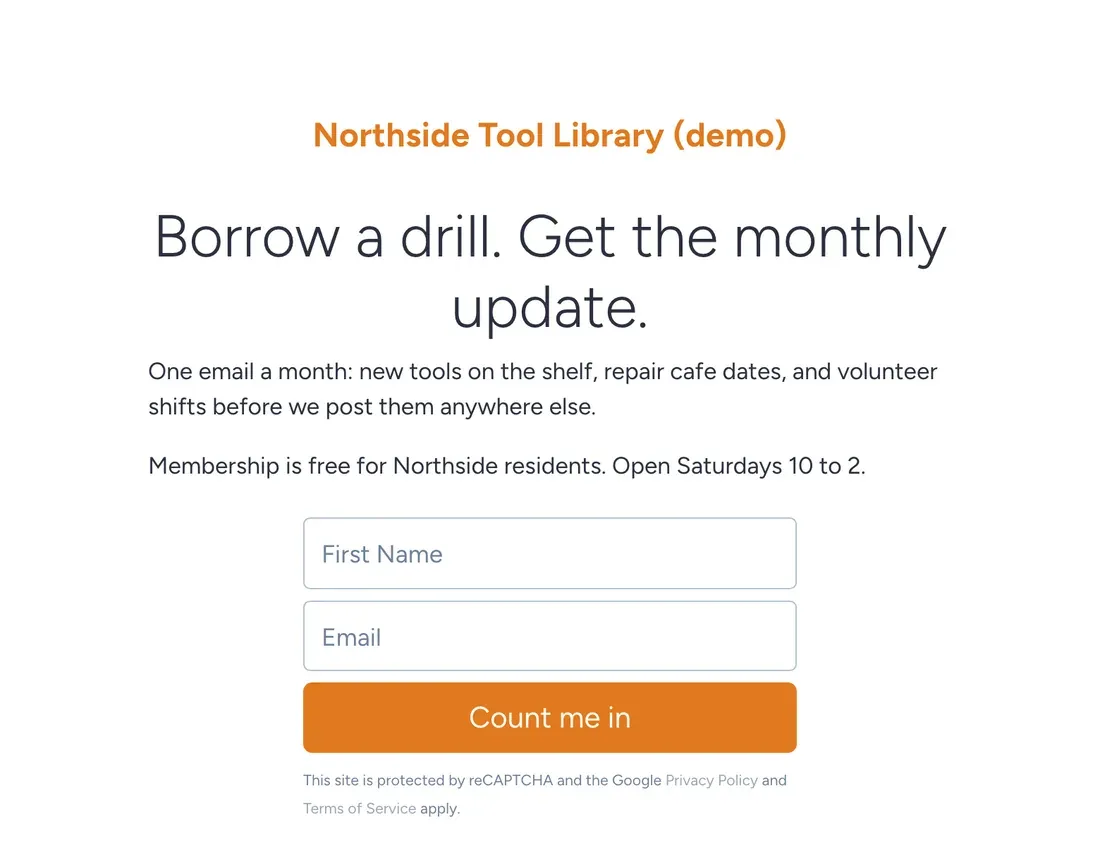
Supporters stay when they see what their help did. Email is the cheapest way to show them, and small nonprofits usually can't afford the tools the big ones use.
The example is Northside Tool Library, a made-up nonprofit that lends drills, ladders and pressure washers to neighbors. It's invented. The setup, the emails and the screenshots are real.
One story beats ten statistics
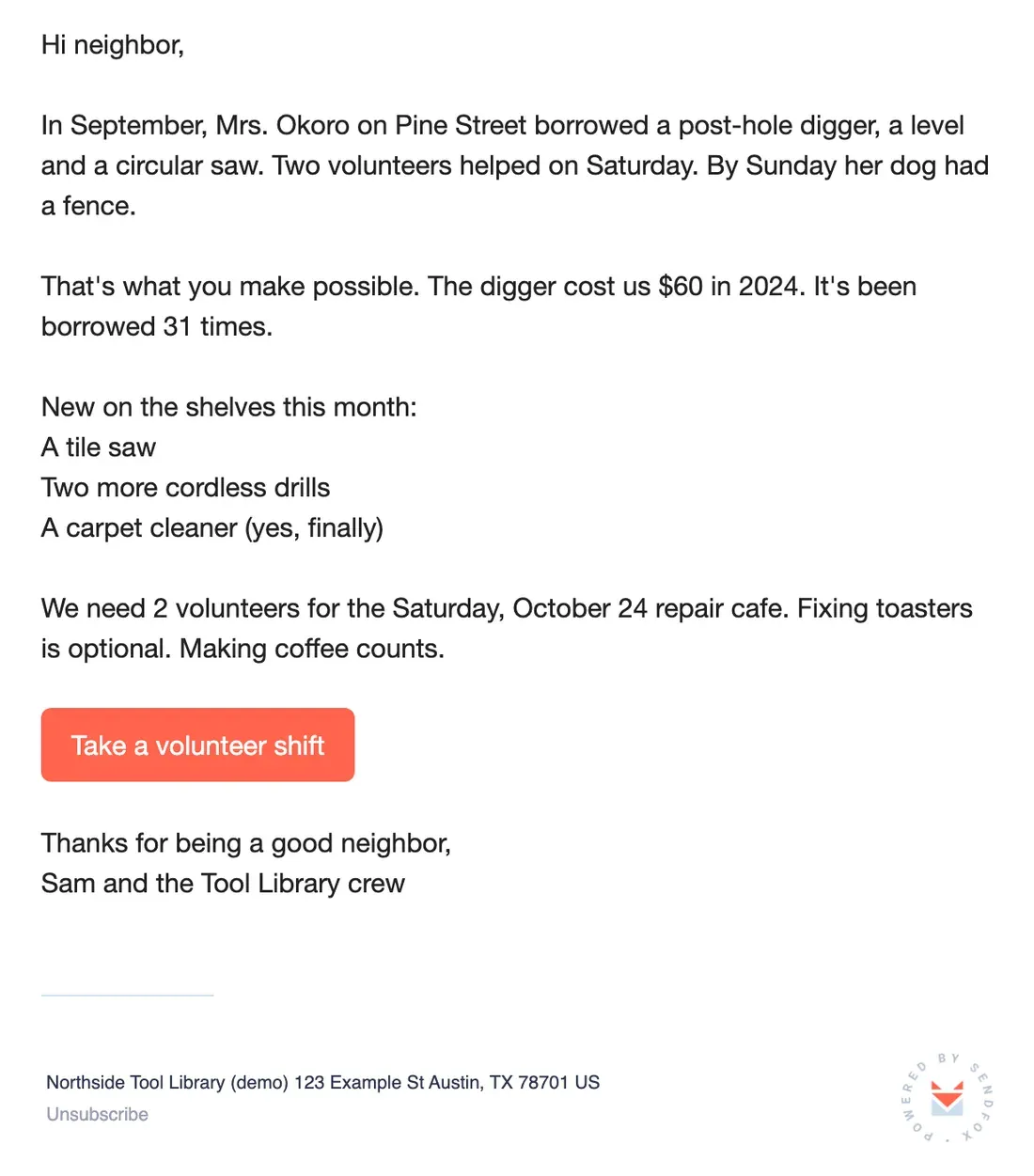
Here's the monthly email. One neighbor, one project, one number that means something, one ask.
Use real stories and real numbers from your own records, and ask permission before naming anyone. "31 times" is the number people remember. A pie chart of annual outcomes isn't.
Copy the text of this email
Hi neighbor,
In September, Mrs. Okoro on Pine Street borrowed a post-hole digger, a level and a circular saw. Two volunteers helped on Saturday. By Sunday her dog had a fence.
That's what you make possible. The digger cost us $60 in 2024. It's been borrowed 31 times.
New on the shelves this month:
A tile saw
Two more cordless drills
A carpet cleaner (yes, finally)
We need 2 volunteers for the Saturday, October 24 repair cafe. Fixing toasters is optional. Making coffee counts.
[Button: Take a volunteer shift]
Thanks for being a good neighbor,
Sam and the Tool Library crew
Thank people within a minute of joining. Automate it and never think about it again.
From the SendFox teamSay you have 1,000 neighbors on the list. If 50% open the Giving Tuesday email, 500 people read the story.
If 2% of the whole list give $25, that's $500. For a tool library, that's a new tile saw and a year of drill bits.
Rough math, not a promise. Round numbers for illustration; they aren't SendFox data, and your list will do its own thing.
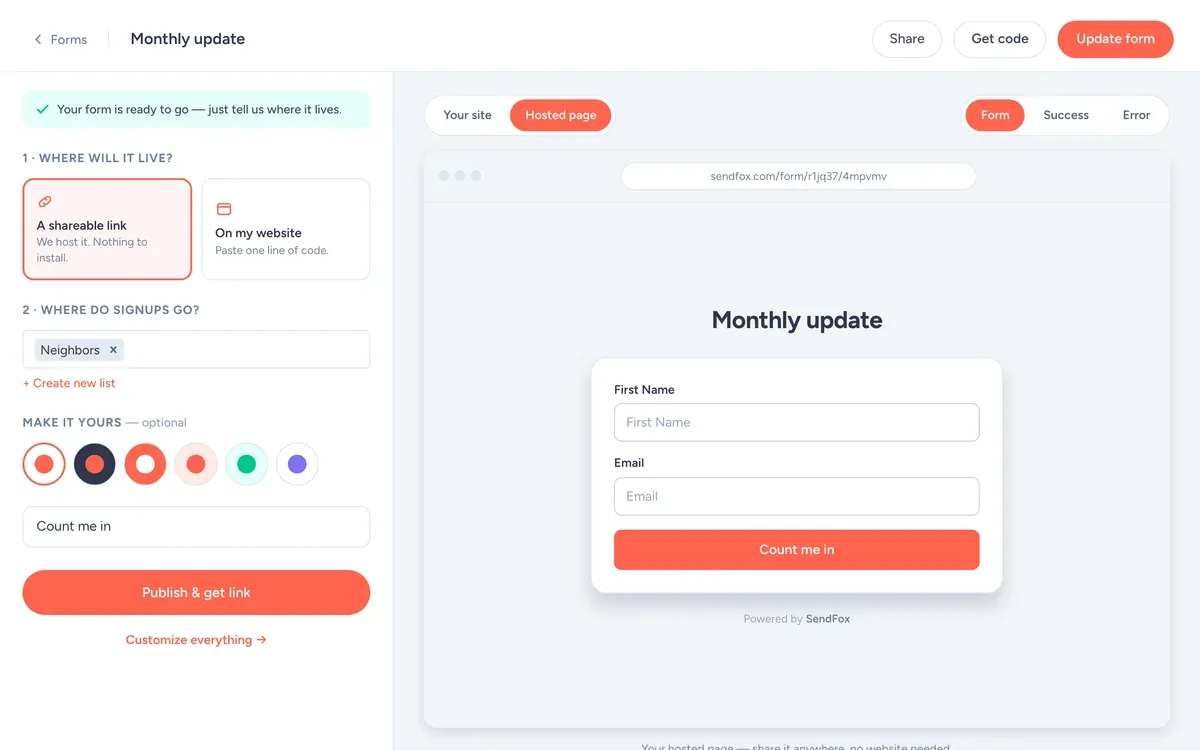
The signup form
- Fields: First name and email. Every extra field costs signups.
- Button: "Count me in"
- What they get: The monthly update, plus first dibs on volunteer shifts.
- Where signups go: the Neighbors list, which starts the welcome automation.
Use it as a hosted link (your bio, a QR code, the back of a book) or paste one line of code to put it on your site.
Thank people automatically
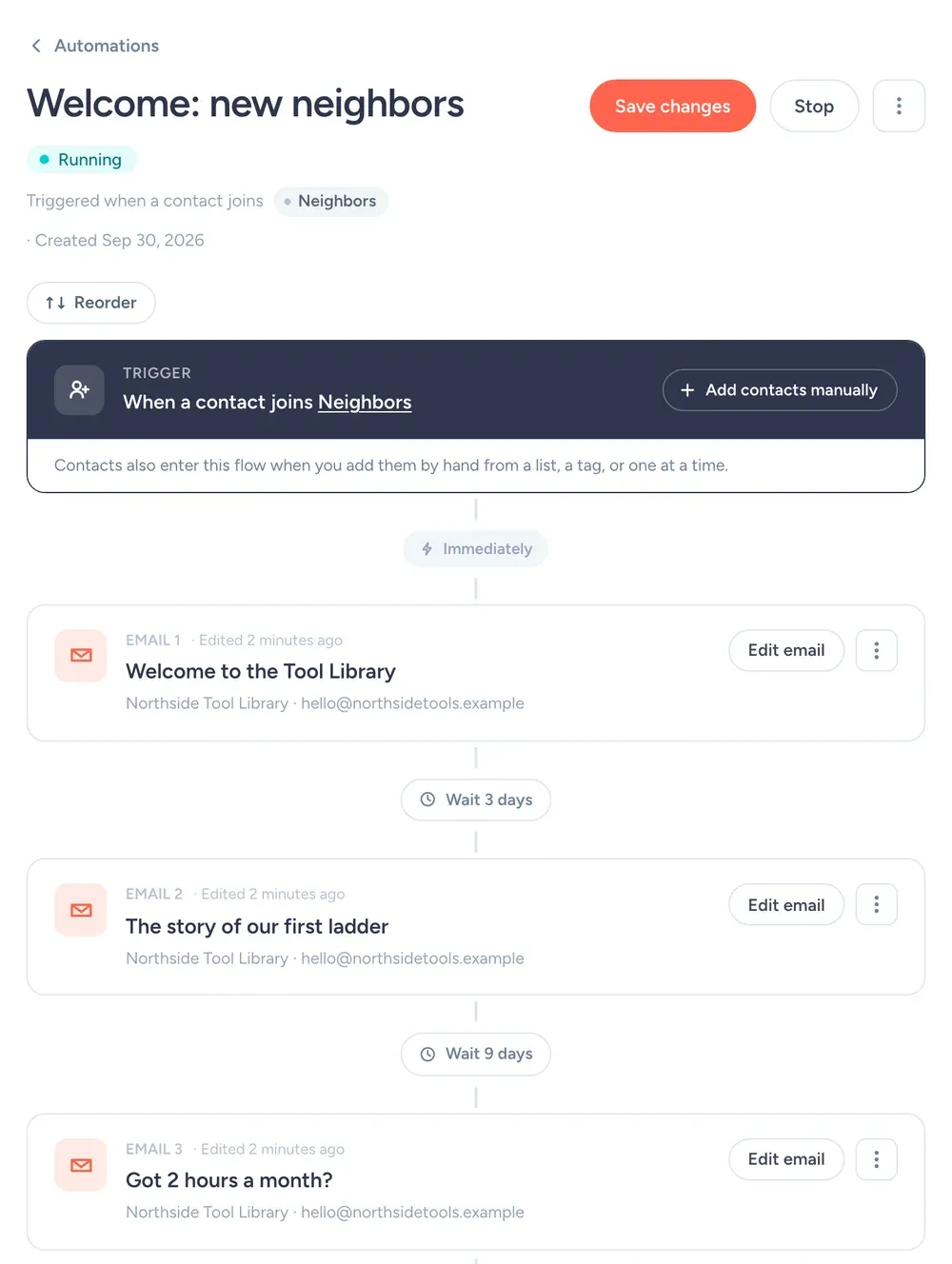
Every new supporter gets a thank-you within a minute, then the story, then the volunteer ask. It runs when someone joins the Neighbors list:
- Right away"Welcome to the Tool Library"How borrowing works, hours, and the most-borrowed tools.
- 3 days later"The story of our first ladder"Why the library exists, in 150 words.
- 9 days later"Got 2 hours a month?"The volunteer ask, with a link to the Volunteers list form.
Don't ask for money in the welcome sequence. Ask for time first. Volunteers turn into donors on their own.
Lists and tags to create
Create these on day one, with these exact names, so every email has an obvious place to go.
NeighborslistEveryone. The monthly update goes here.
VolunteerslistShift sign-ups only.
DonorslistThank-yous and year-end asks.
Giving season, with dates
Most small nonprofits ask for money three or four times a year. Here's how Northside handles the big one:
- Thu Oct 15
Monthly impact email (above).
- Thu Nov 12
Monthly impact email. No ask.
- Tue Dec 1
Giving Tuesday: one story, one link to the donation page.
- Thu Dec 10
Donors list only: a thank-you with a photo, no ask.
- Tue Dec 29
Year-end ask to everyone who hasn't given this year.
If every email asks for money, people stop opening them. Most of your emails should just say thanks and show what happened.
The SendFox features that fit a nonprofit
Lists
Neighbors, Volunteers and Donors, so each email reaches the right people.
Free: 3 lists · Lifetime & Pro: unlimitedImport
Bring supporters from a CSV, Mailchimp, Kit or Google Contacts.
Every planSmart Pages and forms
A signup page for flyers and tabling, or a form on your website.
Free: 1 · Lifetime & Pro: unlimitedTeammates on Pro
On Pro, invite staff and volunteers to help run the account.
ProSubject lines
Make the ask easy to say yes to
"Please consider supporting our work" is easy to ignore. "$25 buys a new drill bit set for the shelf" isn't. Tie every ask to one specific, real thing you'll buy or do.
Put the ask in one link, and repeat that one link at the bottom. Don't give people four choices (donate, volunteer, share, follow us). They'll pick none.
Then say thank you like a person. A thank-you email with a photo of the thing they paid for does more for next year's giving than any appeal you'll write.
Settings for a nonprofit list
| Setting | What to set | Why |
|---|---|---|
| From name | Northside Tool Library | Neighbors know the library, not a person. |
| From email | An address you actually read | Replies go to your from address. Replies are the best signal you'll get. |
| Send time | Thursday, 5pm | After work, when people plan the weekend. Campaigns schedule in your time zone. |
| Double opt-in | Leave it on to start | Confirmed subscribers mean fewer typos and fake signups. Single opt-in is available on Pro, or on Lifetime after a one-time domain setup. |
| Lists and tags | Neighbors, Volunteers, Donors | So each email goes only to the people it's for. What each one is for is spelled out in the lists and tags section. |
| Engaged only | On for promos, off for must-read news | It sends only to people who opened in the last 90 days or joined recently. |
| Footer | Nothing to add | SendFox adds your mailing address and an unsubscribe link to every campaign. You'll need to enter your address before your first send. |
What it costs, and what it doesn't do
Free
1,000 contacts, 3,000 sends a month. 1 Smart Page, 1 form, 1 automation.
Lifetime
5,000 contacts and 300,000 total sends. Unlimited automations, Smart Pages and forms.
Pro
From 5,000 contacts and 100,000 sends a month. Paid newsletters, teammates, no SendFox branding.
| Plan | Price | Contacts | Sends | Smart Pages, forms, automations |
|---|---|---|---|---|
| Free | $0 | 1,000 | 3,000 / month | 1 of each |
| Lifetime | $29, once | 5,000 | 300,000 total | Unlimited |
| Pro | From $19 / month | 5,000 to 250,000 | From 100,000 / month | Unlimited |
Free and Lifetime emails carry a small SendFox footer; Pro removes it. Pro also adds paid newsletters on your own Stripe account, MCP access and teammates. Current plans: sendfox.com/pricing.
Free covers 1,000 contacts and 3,000 sends a month. $29 once covers 5,000. SendFox doesn't take donations. Link to your donation page from any email.
How that compares to 12 other tools at 5,000 to 100,000 subscribers: email marketing pricing compared.
FAQ
What is the best email marketing platform for a small nonprofit?
One that is cheap and simple enough for volunteers. SendFox is free for 1,000 contacts and 3,000 sends a month, then $29 once for 5,000 contacts, with welcome automations and scheduling included.
Can SendFox take donations?
No. SendFox handles email. Link to your existing donation page in your emails.
How often should a nonprofit email supporters?
Once a month with an impact story, plus 3 or 4 appeals a year around moments that matter, like year-end giving.
Can volunteers help run the account?
On Pro, yes. You can invite teammates to manage emails and contacts.
Copy this setup this afternoon
Free for 1,000 contacts. $29 once for 5,000. Import from Mailchimp, Kit or a CSV.
Free up to 1,000 contacts. No card.
Keep reading
The example senders on this page are made up. The screenshots are from a SendFox demo account set up to match them, before any emails were sent.