Feature by feature
The plan each of us would sell you at 5,000 subscribers.
5,000subscribers |
 Substack
Free |
 SendFox SendFoxLifetime |
|---|---|---|
| Price | $0 / month, plus 10% of every paid subscription, plus Stripe fees | $29, once |
| Contacts | 5,000 | 5,000 |
| Email sends | Unlimited | 300,000, no monthly cap |
| If your list doubles | Still $0 a month, plus 10% of every paid subscription, plus Stripe fees | Pro 2, $39 / month |
Substack prices from support.substack.com, no monthly fee, checked September 2026. SendFox prices from our pricing page.
What you'd pay over 1, 2 and 3 years
Substack
10% of paid subscriptions1,000 contacts
5,000 contacts
10,000 contacts
Substack is free to send, so the chart uses an example: a paid newsletter at $5 a month where 5% of the list pays. Substack keeps 10% of that; SendFox paid newsletters are on Pro and take no platform fee. Stripe's processing fees apply to both and aren't shown.
When Substack is the better pick
We'd rather you pick the right tool than switch and regret it. Substack is the better call when:
- You're starting from zero and want discovery through the Substack app, recommendations and leaderboards.
- You don't plan to charge, so the 10% never applies.
- You want podcasts, video and a reader app bundled in.
Why writers leave Substack
The 10% never stops
Substack keeps 10% of every paid subscription for as long as you publish, plus Stripe's fees. At $10,000 a month in paid subs, that's $1,000 a month to Substack.
Your readers are in their app
Substack recommends other writers to your readers. That's great for discovery and less great for you.
Email tools are thin
Welcome sequences, drips and segmented sends are what an email tool is for.
As of Sep 2026, from support.substack.com.
Switching in an afternoon
Most people do this on a Sunday with a coffee. Here's the whole thing.
- Export a CSV from Substack. On Substack, open your Subscribers page, click the three dots, then Export, and download the CSV.
-
Import it into SendFox. Open the import screen, choose Upload a file, pick a list and map the columns.

The SendFox import screen. -
Recreate your signup form. Pick a hosted link or paste one line of code on your site, and choose which list signups go to. Swap the old form on your site for the new one.
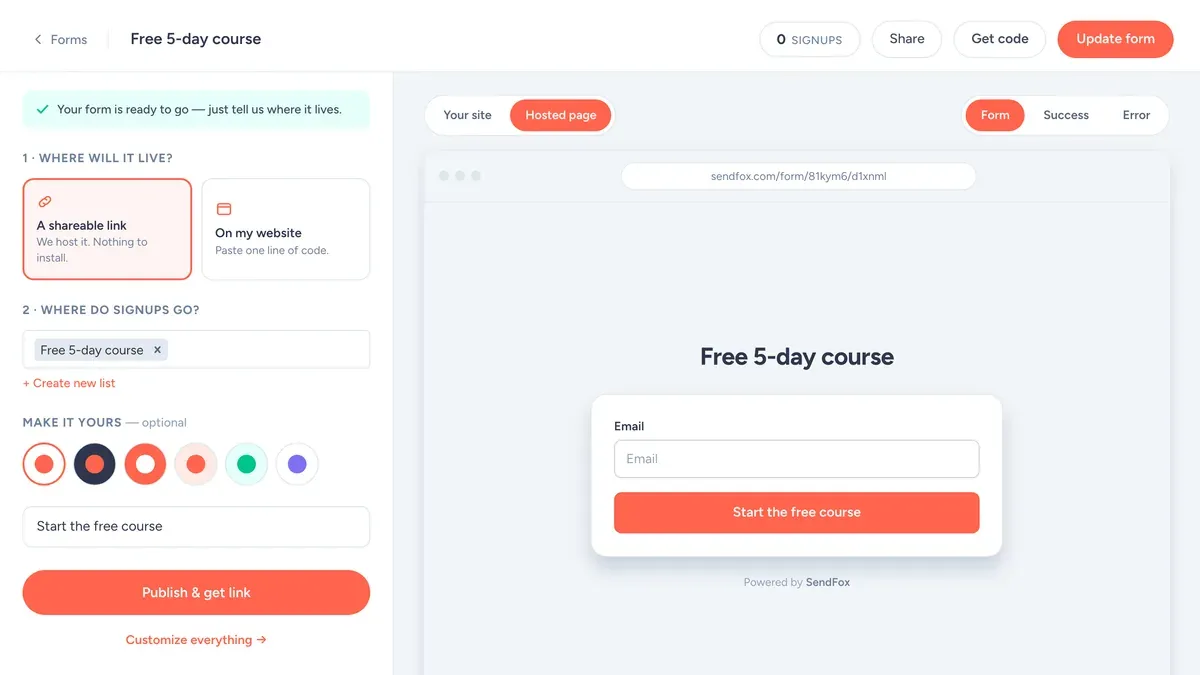
The SendFox form builder: where it lives, where signups go, what the button says. -
Rebuild your welcome email and re-send it. Create an automation triggered when someone joins your list and paste in your welcome emails. Then use "Add contacts manually" to drop your imported list in, so everyone gets a friendly hello from your new sender instead of a surprise.
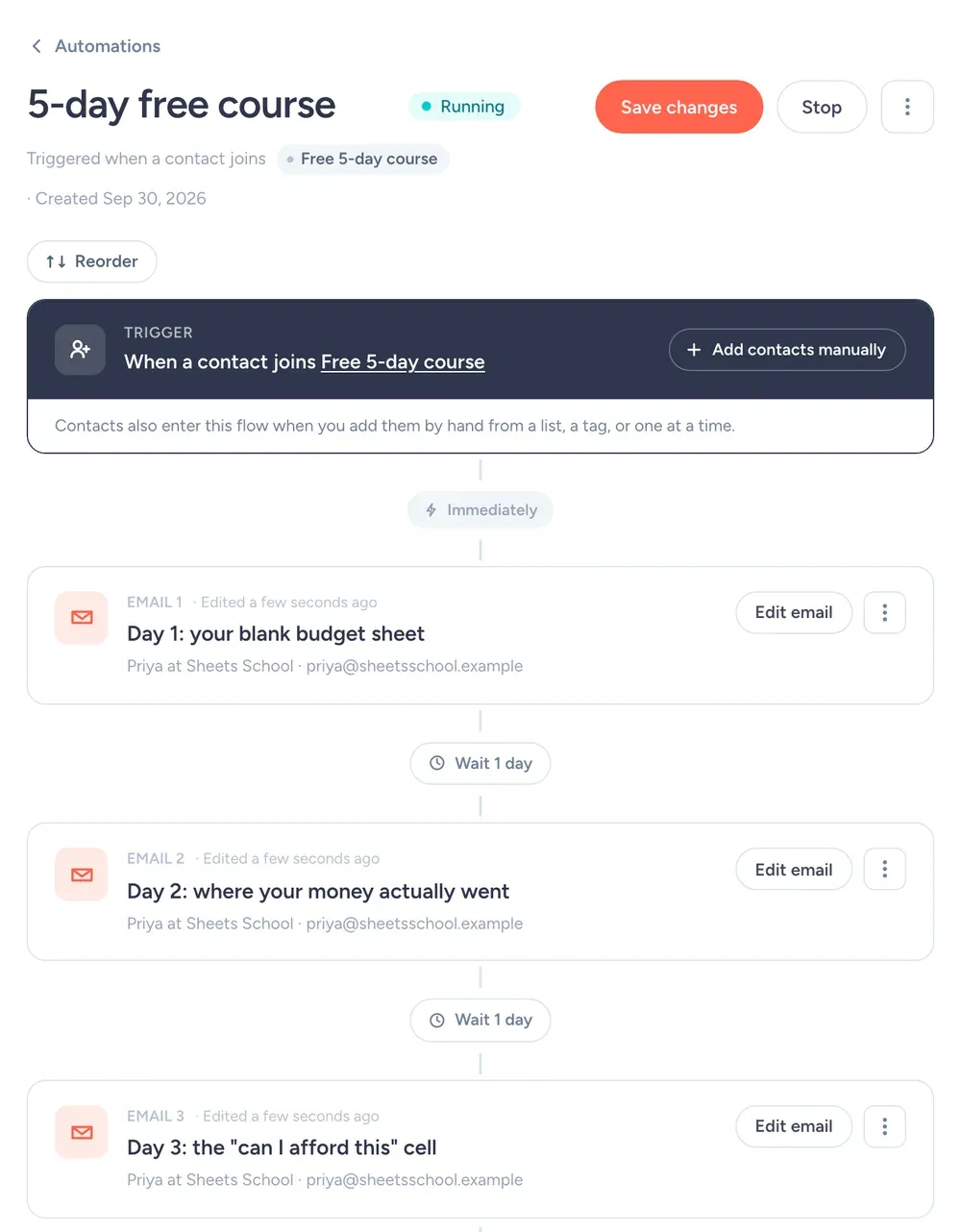
A 3-email welcome automation in SendFox (from a demo account). - Send your next newsletter from SendFox. Then cancel Substack once you've checked the first send landed.
More comparisons
SendFox vs AWeber · SendFox vs Flodesk · SendFox vs EmailOctopus · All comparisons →
SendFox vs Substack: quick answers
Is SendFox a good alternative to Substack?
For writers who sell subscriptions or want real email marketing tools, yes. Substack is free to publish but takes 10% of every paid subscription (support.substack.com, September 2026). SendFox paid newsletters (on Pro) run on your own Stripe account with no platform fee, and the plan itself is free up to 1,000 contacts or $29 once for 5,000.
How much does Substack cost compared to SendFox?
Substack has no monthly fee; it takes 10% of paid subscription revenue, and Stripe charges its processing fee on top. A newsletter earning $2,000 a month pays Substack $200 a month, $2,400 a year, before Stripe. SendFox Lifetime is $29 once and takes nothing from your sales.
What does Substack do that SendFox does not?
Substack is a publishing platform with a reader app, a recommendation network, podcasts and video hosting, and comments. SendFox is an email marketing tool: campaigns, automations, forms, landing pages and a paid newsletter option. If discovery inside the Substack app matters more than the 10%, stay.
Can I import my Substack subscribers into SendFox?
Yes. Export your subscriber list from Substack as a CSV and upload it to SendFox. Most imports take a few minutes. Paid subscribers keep paying you through Stripe; you reconnect them to a SendFox paid newsletter on your own Stripe account.
Also compared: Mailchimp, Kit, beehiiv, MailerLite, AWeber, Flodesk, EmailOctopus, GetResponse, ActiveCampaign, Ghost, Moosend.